
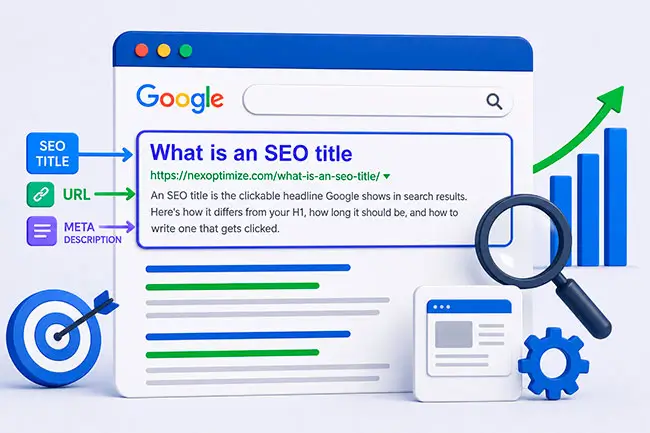

An SEO title, also called a title tag or meta title, is the clickable headline that appears in search results, browser tabs, and social share previews. It lives in a page’s HTML <title> tag and is technically separate from your visible H1 heading, even though the two often say roughly the same thing. Getting this small piece of HTML right is one of the highest-leverage, lowest-effort parts of on-page optimization, closely related to the broader question of how many keywords a page should target, since the title tag is usually where your primary keyword does its most important work.
It’s easy to underrate because it’s just one line of text, but the title tag is the single biggest lever you have over whether someone actually clicks your result once you’ve already earned the ranking.
SEO title vs. title tag vs. H1: what’s actually different
These three terms get used interchangeably, but they’re technically distinct:
Title tag is the raw HTML element: <title>Your Page Title Here</title>. This is the source of truth Google reads.
SEO title is really just the practice of writing that title tag with search intent, keywords, and click-through rate in mind, rather than leaving it as a default CMS-generated string.
H1 is the main visible heading on the page itself, seen by visitors reading the content, not searchers scanning results. Google recommends these two align in topic and tone, but they don’t need to be identical, and often shouldn’t be. Your H1 can be written for the reader who’s already on the page; your title tag has to work harder to earn the click in the first place.
How long should an SEO title be?
The commonly cited guideline is 50 to 60 characters, but that’s a rough proxy for the real constraint: Google truncates titles based on pixel width, not character count, roughly 580 pixels on desktop. Because letters vary in width (a lowercase “i” takes far less space than a capital “W”), two titles with the same character count can display very differently.
The safest practical approach: keep titles under 60 characters, front-load the most important words in case of truncation, and preview how the title actually renders using a SERP snippet tool before publishing rather than relying on a character counter alone.
Google doesn’t always use the title you write
This is worth knowing upfront because it changes how you should think about title writing: Google has openly said it will sometimes rewrite a page’s displayed title in search results, using an H1, other on-page text, or even anchor text from other sites linking to the page, if it judges the original title tag to be a poor match for the query or too long to display well.
This became far more common after Google’s title-rewriting update in 2021. The practical takeaway isn’t “titles don’t matter, Google ignores them anyway.” It’s the opposite: titles that are unclear, stuffed with keywords, overly long, or disconnected from the page’s actual content are exactly the kind Google is most likely to override. A clear, accurate, well-structured title is far less likely to get rewritten.
What makes a good SEO title
Lead with the primary keyword, naturally: Search engines and searchers both scan the front of a title first. If the primary keyword fits naturally near the beginning, use that position; forcing it there at the cost of readability isn’t worth it.
Make it specific, not generic: “SEO Services” tells a searcher almost nothing. “Local SEO Services for Multi-Location Businesses” tells them exactly what they’re clicking into.
Write for the click, not just the crawler: A title can be perfectly optimized and still get ignored in results if it doesn’t give someone a reason to choose it over the other nine blue links on the page. Numbers, clear benefit statements, and current-year references (“2026 Guide”) all tend to improve click-through rate when they’re accurate, not just decorative.
Keep every title unique: Duplicate title tags across multiple pages confuse both search engines and users trying to tell your pages apart in results, and can dilute rankings for both pages involved.
Include your brand name where it earns its place: Adding a brand name at the end of a title (” | YourBrand”) can help with recognition and trust for pages where brand association helps, but it’s not mandatory on every single page, especially where the character budget is tight and the topic itself needs the space more.
Match search intent, not just keyword text: A title matching the exact keyword string but aimed at the wrong intent (selling a product when the searcher wants a how-to guide) will underperform even with a strong ranking position.
Real examples: weak title vs. strong title
Seeing the difference side by side makes the best-practice list above easier to apply.
Weak: “Home | Acme Digital Marketing” Strong: “Digital Marketing Agency in Austin | Acme” The weak version wastes the entire title on a generic page label. The strong version front-loads the service and location, which is what someone searching would actually type.
Weak: “SEO Services SEO Agency SEO Company Affordable SEO” Strong: “Affordable SEO Services for Small Businesses | Acme” The weak version is keyword-stuffed and reads as spam to both users and Google’s systems. The strong version covers the same core intent once, clearly, with room left for a differentiator (“affordable,” “for small businesses”).
Weak: “Blog Post 47” Strong: “Does Page Speed Affect SEO? What the Data Shows” Default CMS-generated titles like the weak example give a searcher zero reason to click and give Google nothing to match against a query.
Title templates by page type
Different page types tend to perform best with slightly different title structures. These aren’t rigid formulas, but they’re a reliable starting point:
- Blog posts / guides: [Question or Topic] | [Optional benefit or year]: e.g. “How Many Keywords Should You Target Per Page? (SEO Guide)”
- Service pages: [Service] in [Location or Niche] | [Brand]: e.g. “Local SEO Services for Multi-Location Businesses | NEXOPTIMIZE”
- Product pages: [Product Name] – [Key Differentiator] | [Brand]: e.g. “Ergonomic Office Chair with Lumbar Support | Acme”
- Category / listing pages: [Category Name]: [What’s Included] | [Brand]: e.g. “Running Shoes: Men’s & Women’s Styles | Acme”
- Location pages: [Service] in [City] | [Brand]: e.g. “SEO Services in Bromley | NEXOPTIMIZE”
Large sites with thousands of templated pages (e-commerce catalogs, multi-location service businesses) often generate titles programmatically from a pattern like these. The tradeoff is scale versus nuance: templated titles are fast to deploy but can’t account for a specific page’s unique selling point the way a hand-written title can, so it’s worth manually reviewing and rewriting titles for your highest-traffic or highest-value pages even on a templated site.
Tools for testing and previewing titles
Since pixel-width truncation makes character counting an imperfect proxy, it’s worth actually previewing how a title will render before publishing:
- SERP snippet preview tools (built into most SEO plugins like Yoast and Rank Math, and available as free standalone tools) show a live mockup of how the title and meta description will likely appear in Google’s results.
- Google Search Console’s Performance report shows the actual click-through rate a page’s current title is achieving for its ranking queries, which is the most reliable signal for whether a title is working, far more useful than any pre-publish estimate.
- Manual SERP checks for your actual target keywords show how your title compares directly against competitors currently ranking for the same query, which often reveals gaps a tool alone won’t surface (everyone using the same generic phrasing, for instance, leaving room for a more specific one to stand out).
Titles and AI-driven search
As more search traffic shifts toward AI-generated answers and overviews rather than the traditional ten blue links, title tags still play a role, but a slightly different one. AI systems summarizing or citing a page tend to favor titles that clearly and specifically describe what the page actually answers, the same qualities (clarity, specificity, accurate intent match) that reduce the odds of Google rewriting a title also make a page easier for an AI system to accurately represent when citing it as a source. Vague or clickbait-style titles that might have squeezed out a click in traditional results tend to underperform in this context, since there’s no visual curiosity gap to exploit when an AI is deciding what to summarize.
Common SEO title mistakes
- Keyword stuffing. Repeating the same term twice in a 60-character space reads as spam to both users and Google’s systems.
- Leaving the default CMS title in place. Many platforms auto-generate a title from the page name or first heading, and it’s rarely optimized for either keywords or clicks.
- Writing the same title as the H1, every time, without variation. This isn’t wrong, but it’s a missed opportunity to make the search-results version specifically click-worthy.
- Ignoring pixel-width truncation. A title that reads perfectly in a document but gets cut off mid-word in results looks unfinished and can suppress click-through rate.
- Clickbait that doesn’t match the content. This might win a click once, but it damages engagement signals and trust when the page doesn’t deliver on the title’s promise.
FAQs
What is an SEO title used for?
It’s the clickable headline shown in search results, browser tabs, and social previews, written specifically to include relevant keywords and encourage clicks, distinct from the H1 heading visible on the page itself.
Does the SEO title need to match the H1 exactly?
No. They should align in topic, but the title tag is written to earn a click in search results while the H1 is written for a reader already on the page. Slight variation between the two is normal and often beneficial.
Why did Google change my page's title in search results?
Google occasionally rewrites displayed titles when it judges the original to be unclear, too long, keyword-stuffed, or a poor match for the query. Writing clear, specific, appropriately-length titles reduces how often this happens.
How many characters should an SEO title be?
Roughly 50 to 60 characters is a safe guideline, though the real constraint is pixel width (about 580 pixels on desktop), so previewing the actual rendered title is more reliable than counting characters alone.
Should every page include the brand name in its title?
Not necessarily. It can help with recognition on some pages, but on character-constrained titles where the topic itself needs the space, it’s fine to leave it out.
Can I use the same title tag on multiple pages?
No. Duplicate titles make it harder for search engines and users to distinguish between pages, and can dilute rankings for all pages that share the same title.
Should large sites use automatically generated titles?
Templated titles are a reasonable starting point for large catalogs or multi-location sites, but they should be manually reviewed and rewritten for high-traffic or high-value pages, since a template can’t account for what makes a specific page unique.
Do SEO titles still matter with AI-generated search results?
Yes, arguably more so. AI systems summarizing or citing pages tend to favor titles that clearly and specifically describe the page’s content, the same clarity that helps a title avoid being rewritten by Google also helps it get accurately represented in an AI-generated answer.